HDB Renovation Guide Singapore: Built-In Study Tables
This HDB Renovation Guide Singapore walks you through building a study table that fits a small flat in 2025/2026. The takeaway: a built-in desk saves floor space and hides cables, and you should plan the power points with a Licensed Electrical Worker before the carpenter arrives so nothing gets chased into the wall after tiling.
Why a built-in study table makes sense
Loose desks leave a gap behind that collects dust and cords. A built-in runs wall to wall and gives you a clean work surface you can wipe in one pass.
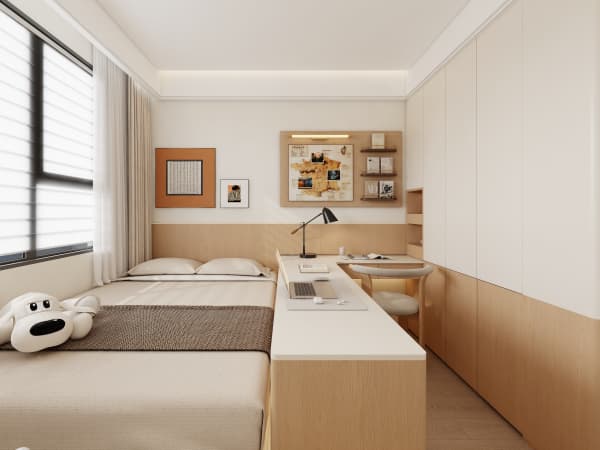
In a 4-room BTO the common bedroom often doubles as a study, so the desk has to share the room with a wardrobe. Custom carpentry makes both fit along one wall instead of fighting for the floor.
Two people working from home is now normal, so a longer built-in beat a pair of separate desks in almost every flat I've measured this year.
Carpentry that follows your wall
A built-in desk is pure carpentry, so no permit is needed. The carpenter builds a slab between two supports or floats it on a wall bracket fixed into the concrete.
- Pick a depth of 60cm so a monitor and keyboard fit with room to spare
- Add a shallow overhead shelf for books and the router
- Build drawers instead of legs to use the dead space below
- Round the front edge so it doesn't dig into your wrists
This HDB Renovation Guide Singapore approach keeps the room feeling open, which matters when two kids study at once and the chairs need to pull out without hitting the bed.
Cable management and task lighting
Cables are the part that ruins a neat desk. Plan a hidden channel behind the back panel and a hole for the power strip before the board is cut.
- List every device you'll plug in before the build starts
- Ask a Licensed Electrical Worker to add a power point behind the desk
- Route the cables through a brush plate, not a raw hole
- Fit an LED strip under the shelf for task lighting

Rewiring beyond existing points must be done by a Licensed Electrical Worker under EMA rules. Don't let a general contractor run new cables, because that breaches the rules and your insurance if there's a fire.
For lighting, a warm-white strip at 4000K is easy on the eyes during late study sessions. I've seen cheap blue-white strips cause headaches within a week of nightly use.
Pick boards that handle the heat
A desk sits under a lamp and a laptop for hours, so pick E0 or E1 boards with proper edge banding. The banding stops the edge from peeling where your forearm rests day after day.
Soft-close drawers keep the study quiet when someone else is sleeping. It's a small upgrade that pays back on every early shift.
Size it for real use, not the showroom
A desk that looks big in a catalogue is too small for two screens and a notebook. Measure your gear first, then add 15cm so papers have a home.
Keep 10-15% of your budget as contingency in case you add a second user later, and confirm your HDB-approved contractor coordinates the carpenter with the electrical timing.
Build the desk to your actual devices and get the power points right with a Licensed Electrical Worker, and the study corner will stay clean for years. It's the spot where homework and remote work happen daily, so make it solid now and you won't be drilling into fresh tiles to add a socket six months down the road.